
Hello, Guys!! If you want to install Python in ubuntu , Follow these steps:-
Ubuntu 16.04 comes with both Python 2.7 and Python 3.5 by default. You can install Python 3.6 along with them via a third-party PPA by doing following steps:
1. Open terminal via Ctrl+Alt+T or searching for “Terminal” from app launcher. When it opens, run command to add the PPA:
sudo add-apt-repository ppa:jonathonf/python-3.6

2. Then check updates and install Python 3.6 via commands:
sudo apt-get update

sudo apt-get install python3.6
Now you have three Python versions, use python command for version 2.7, python3for version 3.5, and/or python3.6 for version 3.6.1.

3. To make python3 use the new installed python 3.6 instead of the default 3.5 release, run following 2 commands:
sudo update-alternatives --install /usr/bin/python3 python3 /usr/bin/python3.5 1

sudo update-alternatives --install /usr/bin/python3 python3 /usr/bin/python3.6 2
Finally switch between the two python versions for python3 via command:
sudo update-alternatives --config python3
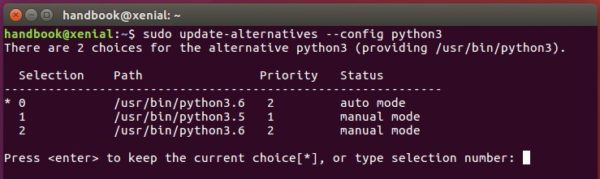
After selecting version 3.6:
python3 -V

UPDATE: due to this bug, gnome-terminal won’t launch after step 3, a workaround is running following commands to recreate the symlink:
sudo rm /usr/bin/python3

sudo ln -s python3.5 /usr/bin/python3

 Tech Expertise